
The Daily Playbook
Self-help. When you can't remember which command to run at 10am vs. 4pm, this is the answer sheet.
Same format as overview_agentic_workflows: dense, opinionated, no cheerleading.
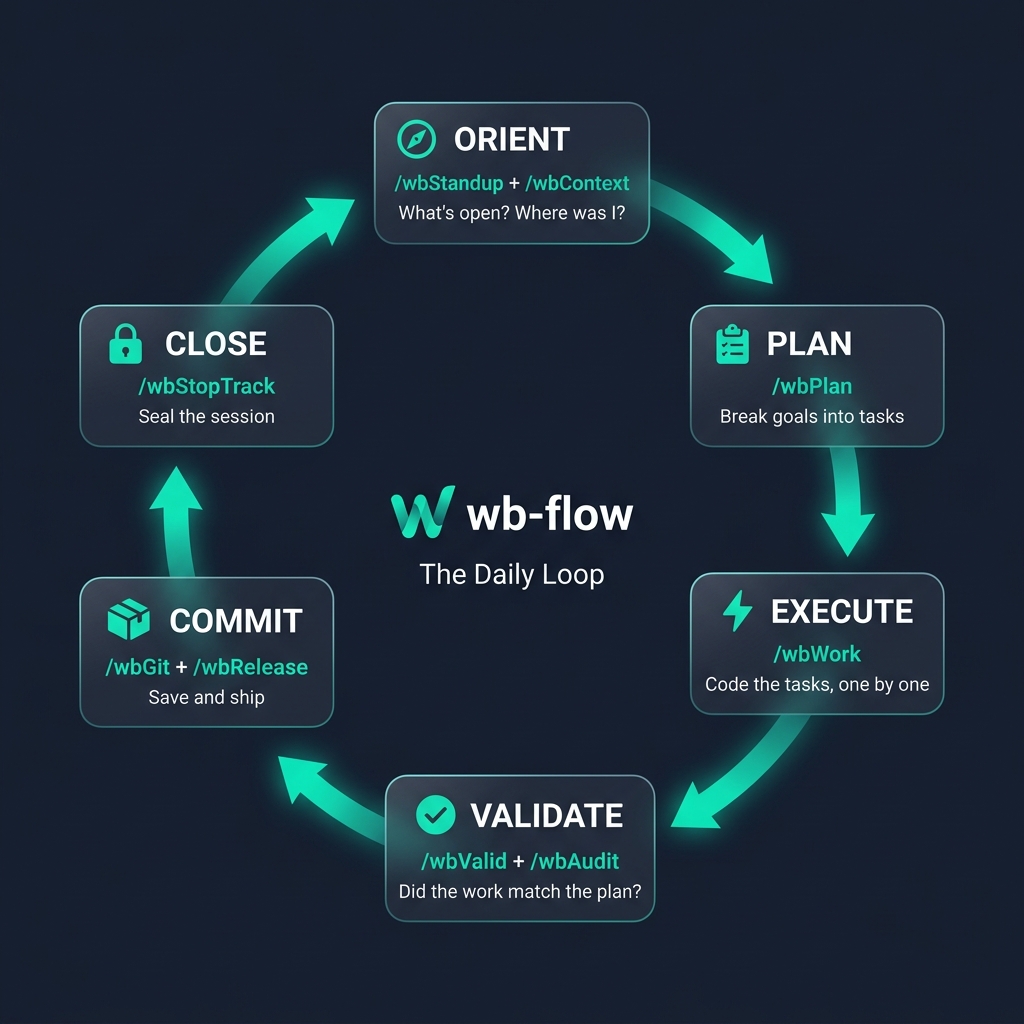
The six-stage daily loop. Each stage feeds into the next through report files, not in-memory state.
The day, as a shape
context.md + dev.md/wbStandupScan past 24h/14d progress across scopes/wbContextSynchronize local project context into AI memory/wbVisionBrainstorm long-term roadmap & features/wbTranslatePrepare internationalization & string tags/wbGit runs twice a day: midday to commit logical units, evening after release to tag. It is the only command that touches git for you; all other commands are read-only w.r.t. the working tree.
Three guarantees about this shape:
- You will not use every command every day. Most days you use 3–5. The shape is a menu, not a checklist.
- The order matters. Running
/wbDeployin the morning before/wbStandupdefeats the point — you'd be shipping without knowing what's in flight. - Each phase ends in a hand-off artifact (context file → plan → audit → release). The artifacts are what stitch the phases together across days.
Morning (10 min, sometimes 2)
What you're solving
You forgot what you were doing. The AI doesn't know either. Neither of you should touch code until you fix that.
The two-command morning
1. /wbStandup core2/
Scans the whole monorepo, reads recent reports/, and tells you: what's in-flight, what's blocked, what's stale. Output goes to reports/YYYY/MM/DD/standups/.
Why it's the first command, not /wbContext: standup is cross-package. You need it before you decide which package to focus on.
2. /wbContext <package-you-chose>
Now that you know the package, sync the AI's understanding of it. This re-reads package.json, scans for drift against the stored context.md, and writes a fresh context report to reports/YYYY/MM/DD/contexts/.
Why both: /wbStandup is breadth, /wbContext is depth. Skipping the second one means the AI is operating on last-week's mental model of the package.
If you're tempted to skip
Common reason: "I know what I'm working on. I was working on it yesterday."
Run /wbContext anyway. It takes 30 seconds and it catches the case where someone else (or yesterday-you, or a /wbRefactor) changed something under you. The cost of skipping is silent drift; the cost of running is nothing.
Midday (the bulk of the day)
What you're solving
You know what to do. Now do it.
The decision tree
Do you have a task list from /wbPlan already?
├── Yes → Execute next unchecked row. Repeat.
└── No ───────────────────────────────────────────┐
 │
 Is the work small enough to describe in one │
 sentence? │
 ├── Yes → Just describe it. Skip /wbPlan. │
 └── No → /wbPlan <package>/ │
 │
 Is the console red? │
 ├── Yes → /wbDebug "<error>" │
 └── No → Continue │
 │
 Are you about to run /wbAudit then /wbPlan │
 on the same package back-to-back? │
 ├── Yes → /wbAudit <pkg>/ --act --wbPlan │
 │ (one run = audit + ranked actions │
 │ + plan for 🔵 multi-step findings) │
 └── No → Continue │
 │
 Are you bored / out of ideas? │
 ├── Yes → /wbVision (low-ROI; see below) │
 └── No → Pick the next task and do it │
The the documentation treats /wbVision as a valid midday option ("You have zero tasks and zero bugs → run /wbVision"). In practice, that's when you should close the laptop, not open a brainstorming session. The best use of /wbVision is:
- Low-energy afternoons when you can't focus on implementation — let the AI generate 5 feature ideas, keep the one that isn't obvious, discard the rest.
- Before
/wbSetupon a new package — ask/wbVisionwhat this package should eventually contain, then encode that indev.md.
Don't use /wbVision as your default "nothing to do" command. Use it deliberately, rarely.
When you hit a wall
/wbDebug "<error message>" is your first move, not your third. The instinct to try fixes before diagnosing is what turns 10-minute bugs into 2-hour bugs. Let the AI form a hypothesis first.
Commit discipline during midday
Once a logical unit of work is complete — one task from a plan, one bug fixed, one example added — run /wbGit. Not at 4pm when you've lost track of what changed. Not at end-of-day when the diff spans 40 files.
/wbGit reads git diff, writes a Conventional Commit message, and (if you tell it) runs git add + git commit. The AI will not touch git without being asked — so midday commits are a discipline, not a default.
Good rhythm: 3–6 commits per working day. If you have 0, you've drifted; if you have 20, the commits are too granular.
State transitions on a live plan
Mid-execution, you'll need to defer / cancel / re-open tasks. Don't ask the AI conversationally — use the state-transition flags. They skip execution and only mutate plan cells:
/wbWork plan.md --id=1 --open # validator rejected output → re-run worker
/wbPlan plan.md --id=3 --def # postpone (both Done and Valid → ⏸️)
/wbPlan plan.md --id>=5 --can # bulk-cancel stale rows
/wbValid plan.md --id=8 --can # cancel only the validation pass
Cell scope: /wbWork touches Done, /wbValid touches Valid, /wbPlan touches both. Multi-flag = rightmost wins.
Why flags rather than chat: a misparsed "defer task 3" on a bad day silently leaves the row as ⬜, and the next standup nags about it forever. Flag form is auditable; chat form is fragile.
Full reference: ../concepts/plan_state_management.
Cross-cutting work (rarely midday)
Two commands exist for cross-cutting refactors that don't fit the task-at-a-time rhythm:
/wbTranslate <component>— pull hardcoded strings into i18n keys + fr.json/ar.json. Use when adding or reworking a user-facing component./wbToWBC <legacy-path>— rewrite legacy HTML tables / Vuetify components intoWBDataViewer/ wbc-ui2 equivalents. Use when modernizing inherited code.
Both are one-off-per-target commands. Running either twice on the same file is almost always a mistake — the first run already did the work; the second will either re-translate (noise) or regress (worse).
Afternoon (30 min, when it matters)
What you're solving
The code works, but it's ugly, has leftovers, or you haven't re-read what you wrote.
The three-command polish
1. /wbClean <package>/ — find dead code, unused files, console.log, commented-out blocks. The report tells you what to delete; you make the actual decisions.
2. /wbAudit <package>/ — the brutal review. This is where you want an AI willing to say "this is bad" rather than "this is fine but could be improved." If the first audit pass feels too gentle, re-run with "harsher, assume I'm shipping this to a paying customer."
3. /wbRefactor <specific-file> — only if audit flagged messiness. Do not refactor preemptively. Refactors change code structure, and an un-audited refactor is how you silently break features.
The single biggest mistake in the afternoon phase
Running /wbRefactor before /wbAudit. Refactor first → audit reviews the refactored version → audit is happy because refactored code tends to look clean → you miss the real issue (the original logic was wrong, but after refactoring, wrong-ly).
Always audit the original. Then refactor if the audit asked for it.
Cheap chains: --act and --wbPlan
The two-step "/wbAudit pkg/ then read findings then /wbPlan pkg/" is now one command:
/wbAudit <pkg>/ --act --wbPlanWhat you get back:
- The audit (same as before).
- A sibling action file ranking findings 1️⃣→N with TODAY/THIS WEEK/THIS MONTH/LATER buckets, recommended model per action, and a "what I would NOT touch" list.
- A sibling plan file with one section per 🔵 multi-step finding — task tables with worker/validator model pairs, ready to execute.
The flags compose:
| Flag | Adds | When |
|---|---|---|
--act | Action file (ranked execution thread) | You want to know what to do, not just what's wrong |
--wbPlan | Plan file (worker/validator tasks for 🔵 findings) | You want a plan to execute, not just a triage |
--act --wbPlan | Both | The default for "I'm doing the polish phase" — replaces audit-then-plan-by-hand |
Same flag pair on /wbReview, /wbStandup. /wbActOn always acts; takes --wbPlan. /wbPlan --wbPlan errors as a no-op (the output is already a plan).
The old two-step still works. Use it when you want manual control over what gets planned — flags are convenience, not mandate. But for the default afternoon polish, --act --wbPlan saves a context switch and produces better-structured artifacts than rewriting the chain by hand.
Full reference: concepts/wbPlan_flag.
When to skip the polish phase entirely
- You're working on an exploratory branch you'll throw away.
- You're in the first 20% of a feature — polishing unfinished work is premature optimization.
- You already ran audit/clean yesterday and nothing has changed.
Evening (5 min, when you're ready)
What you're solving
The code is good. Get it out the door without breaking production.
The shipping order
For a package (to npm):
/wbDoc <package>/— ensure README + JSDoc are current. the agent-generated docs get stale fast; re-running is cheap./wbTest <package>/— must pass. If it doesn't, stop shipping./wbSecure <package>/— red-team scan. If it has CRITICAL findings, don't publish until fixed. WARNINGs are advisory./wbRelease core2/— bumps versions across the monorepo, unpicksworkspace:*links. Monorepo-wide, not per-package./wbPublish <package>/— builds + pushes to npm./wbRelease core2/ --restore— putworkspace:*protocols back so dev keeps working./wbGit— commit the version bumps + tag the release./wbBroadcast <package>/— only if the release is user-visible. Generates announcement kit (social, release notes, blog). Skip for internal refactors.
For an app (to the web):
/wbDoc <app>/— optional for apps, but helpful if you want a deployment changelog./wbTest <app>/— must pass./wbSecure <app>/— especially for anything handling user input. CRITICAL blocks deploy./wbDeploy <app>/ --target=local— serve the prod build locally, click around. Catches base-url and deep-link bugs./wbDeploy <app>/— builds + pushes to GitHub Pages (or your host)./wbGit— commit any config changes from the deploy.
Why /wbRelease is monorepo-wide, not per-package
Because of workspace:*. If you publish wb-dataviewer without also bumping wb-core, consumers installing wb-dataviewer@latest will get a mismatched wb-core from npm while your monorepo uses a newer workspace:* version. /wbRelease coordinates all the version bumps at once, then /wbPublish fires them in the right order.
The things the evening phase must refuse to do
- Refuse to
/wbDeployif a recent/wbTestreport shows failures. The AI should readreports/and abort. - Refuse to
/wbPublishif/wbReleasehasn't run in this cycle. Publishing without a version bump is how you accidentally re-publish the same tarball. - Refuse to
/wbPublish//wbDeployif/wbSecurehas CRITICAL findings. Secrets in public code is a one-way mistake; don't ship past it. - Refuse to ship if
dist/vsdist-dev/are mismatched (you know this one). This is a wbc-ui2 quirk — the check should be in every package'sdev.md. - Refuse to
/wbBroadcastwithout a successful/wbReleaseor/wbPublishin the same cycle. Announcing a release that didn't happen is the embarrassing bug.
If these refusals don't happen automatically, your dev.md is missing them. Add them.
The belt system (when to learn what)
Learning all 21 commands in week 1 is how you forget 15 of them in week 2. The belt system is how you build sticky muscle memory.
⚪ White Belt (first week)
Use only: /wbContext, /wbPlan, /wbAudit, /wbGit.
Why these four: they cover sync → work → review → save. That's a complete loop. /wbGit is in the white belt — not the brown — because if you don't commit, you have no trail of what you did.
Exit criterion: you ran a full feature (/wbContext → describe → /wbAudit → /wbGit) without re-reading the templates.
🔵 Blue Belt (second week)
Add: /wbDebug, /wbRefactor, /wbClean.
Why these next: they handle "something went wrong" and "this got messy." White-belt commands don't cover those.
Exit criterion: the first thing you type when you hit an error is /wbDebug, not a manual grep.
🟤 Brown Belt (third week)
Add: /wbDoc, /wbTest, /wbSecure, /wbRelease, /wbPublish, /wbDeploy.
Why these next: they're the shipping commands, including the security gate. You held off because shipping an experiment is worse than shipping nothing.
Exit criterion: you shipped something real, end-to-end, using the evening flow above — including a /wbSecure pass.
⚫ Black Belt (fourth week onward)
Add: /wbStandup, /wbVision, /wbSetup, /wbLicense, /wbReview, /wbBroadcast, /wbTranslate, /wbToWBC.
Why these last: they're orchestration and cross-cutting refactors. They assume you already have multiple packages in motion. Using them at white-belt level is solving a problem you don't have yet.
Exit criterion: you notice yourself naturally reaching for /wbStandup in the morning and /wbBroadcast after a user-facing release. At that point, the system has become habit.
The rule that beats the belt system
If you only ever use /wbContext at the start of a session, /wbAudit before shipping, and /wbGit to commit your work, you are already 80% of the way there. The other 18 commands optimize the remaining 20%. Don't let the completeness of the system make you feel behind — most days, three commands is the right number.
The session lifecycle (the meta-layer)
The playbook above is inside a session. The session itself has its own lifecycle — open, work, save-point, close — and it's the layer most workflow docs forget exists. Three short reads cover it:
session_lifecycle/1_the_golden_save_point— the rare clean-repo state where every plan task is✅ Valid. The only safe moment to start a major new feature; the cheapest moment to stop guilt-free.session_lifecycle/2_closing_the_session— the 3-step close:/wbStandup,/wbStopTrack --finalize, close the chat window. The third step is the one that actually frees tokens; the first two are bookkeeping that enable it.session_lifecycle/3_opening_a_new_session— the protocol for opening fresh, including the same-day "Cumulative Append" rule (calendar-day = persistence unit; second runs append after---, no_v2suffixes).
The ROI on this is asymmetric: closing wrong costs you tokens-per-message on every subsequent reply forever; closing right is one chat-window-close. Learn it once.
One honest warning
Playbooks like this one lie slightly. The real day has interruptions, meetings, half-finished tasks, changes in priority. You will not march through morning → midday → afternoon → evening in a clean line. You will jump from midday straight to evening because a deploy deadline moved. You will run /wbAudit at 9am because you forgot to yesterday.
The playbook's job is not to dictate the day. It's to give you a default for moments when you don't know what to do next. When you have a clear priority, ignore the playbook and follow the priority.