
/wbWork Documentation Hub
Welcome to the official documentation hub for /wbWork in wb-flow.
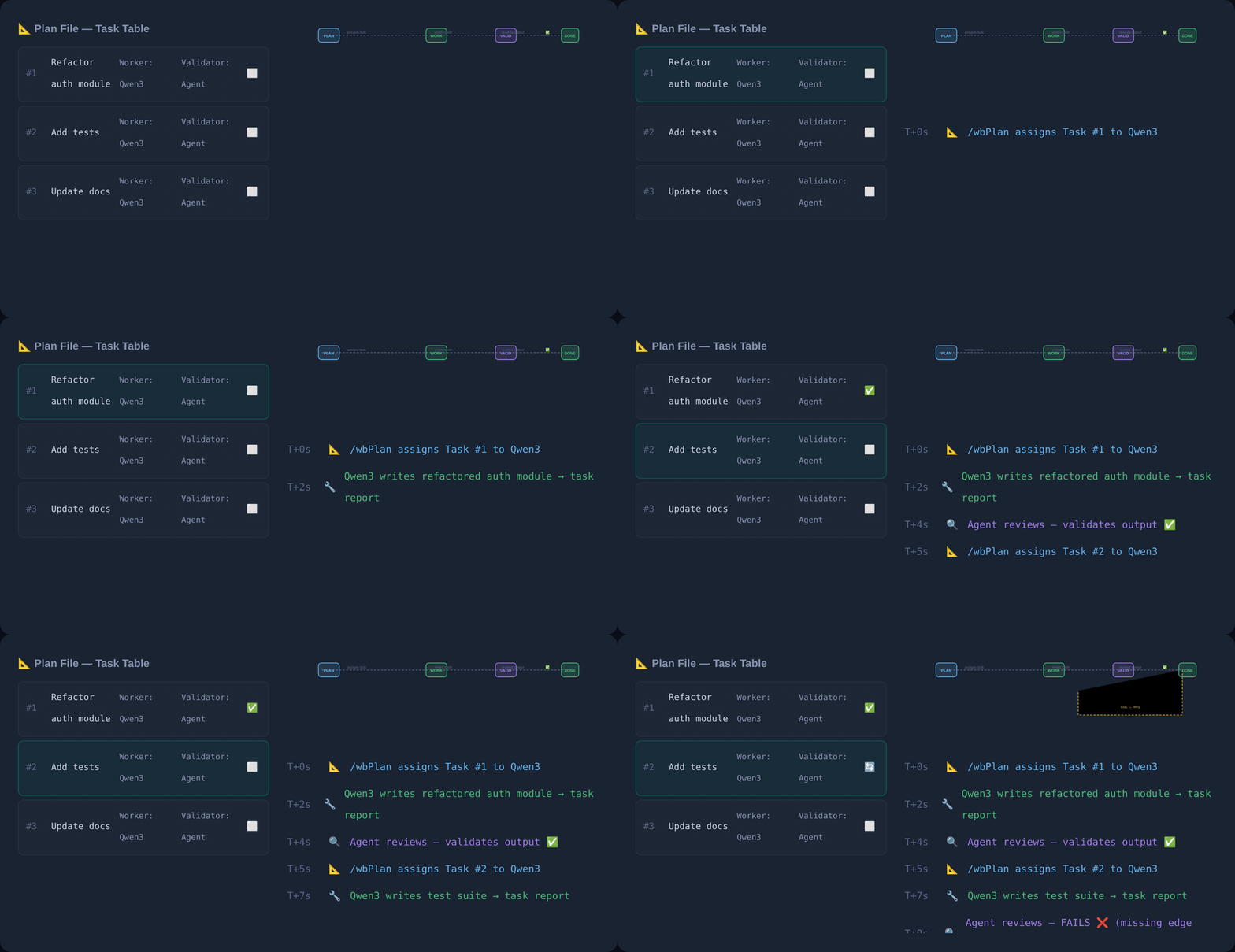
The worker executes, a different agent validates, and a FAIL sends the row back to ⬜ rather than lowering the bar. /wbWork owns the left half of this loop.
TIP
Running a wave costs the orchestrator's context. --summary is already the default and saved a measured 63,002 tokens on one 10-cell wave. For the rest of the levers — merged dispatches, --list before you spend, when --sessions helps and when it hurts — and for who may root a run (plus the temporary codex fallback when Claude is limited), see concepts/orchestrator_and_tokens.
Overview
/wbWork is the work execution engine of wb-flow. It executes tasks defined in your plan files (plan_<scope>.md), generates formal task reports (task_<N>_report.md), updates the ☐ Done checkboxes, and dispatches parallel sub-agent wave jobs via wb-flow wave.
💡 --as Explanation Gate Behavior
- Standard Invocations (without
--as): Matrix task cells contain ONLY the direct execution command:markdown`/wbWork plan.md --id=B23`<br>→ *DeepSeek V4 Pro* *(⏱️ 15 min)* - Explanation-Enabled Invocations (with
--as="<style>"): Matrix task cells prepend/wbExplain:markdown`/wbExplain plan.md --id=B23 --as="expert,steps"`<br>`/wbWork plan.md --id=B23`<br>→ *DeepSeek V4 Pro* *(⏱️ 15 min)*
⏱️ Wave Execution Session Tracking (/wbTrack)
Whenever /wbWork or /wbPlan is executed with the --wave=<label> flag, the execution pipeline automatically wraps the wave dispatches with session tracking:
# Executing /wbWork <path_scope> --wave=A follows this sequence:
1. /wbTrack <path_scope>   # Starts/joins today's session tracking log
2. wave_A.sh dispatches     # Executes parallel wave tasks
3. /wbTrack --stop          # Stops and finalizes session tracking log
🚀 Next Wave Execution Command Suggestions
Below the ## 🌊 Next Executable Sequence matrix and Wave notes, /wbPlan and /wbWork output a dedicated recommendation block calculating total estimated duration (Est. Time) and offering ready-to-run CLI commands tailored for time and cost considerations:
- Option 1 (Next Wave):
.wb/bin/wbRun claude -p --permission-mode auto "/wbWork plan.md --wave=A -y" - Option 2 (With
--as):.wb/bin/wbRun claude -p --permission-mode auto "/wbWork plan.md --wave=A --as="expert,steps" -y" - Option 3 (All Waves):
.wb/bin/wbRun claude -p --permission-mode auto "/wbWork plan.md --wave=all -y"
The --wave=all loop
--wave=all is a recompute loop, not a walk over a list:
repeat {
    W ← the FIRST wave in the matrix, read fresh from the plan file
    dispatch W · wait · classify every cell by the three gates
    transcribe ☐ Done / ☐ Valid into the task table
    recompute both derived blocks:  wb-flow next <plan> --embed
} until the recomputed matrix is empty
Never cache the wave list. The labels printed at the start — A → B → C — are a forecast of the current table, not a schedule. After wave A the recomputed matrix may hold different waves (A1, B1, …), rows postponed out of A, rows a cell added, and none of the rows that closed.
This is how validations go missing. A list captured before wave A was walked as
for A, B, C. Waves B and C dispatched validators built from the pre-A matrix, carrying ids that were no longer open — both returnedNO-OPon a row absent from the table, and four rows finished done but unvalidated. The work was fine; the schedule was stale.
| # | Step | Why it cannot be skipped |
|---|---|---|
| 1 | Read the matrix from the plan file | last pass's in-memory list is already stale |
| 2 | Take the first wave only | later waves were computed against a table that no longer exists |
| 3 | Dispatch · wait · classify | a verdict is not a result |
| 4 | Transcribe ☐ Done / ☐ Valid | the recompute reads the table — an untranscribed result is invisible |
| 5 | Recompute matrix + run-book | both are derived; a stale one dispatches against closed ids |
| 6 | Loop | the next wave is read fresh at step 1 |
Step 5 is the one people drop, because the loop appears to work without it — until a validator is dispatched against an id that closed two waves ago.
--wave=auto is an alias for --wave=all; there is no separate "auto" mode.
Four rules govern it. Each exists because its absence caused a recorded incident.
| Rule | Behaviour |
|---|---|
| Advance only on all-green | Any INFRA / NO-OP / ATTEMPTED cell stops the loop. The next wave's inputs are this wave's outputs; if you do not know which exist, the next wave is meaningless. |
| Escalate when blocked | Ambiguous (several defensible options) → -y adopts the recommendation and continues. Blocked (a decision the plan leaves open, or an action needing a human) → stop and ask, even under -y. |
| Stuck is terminal | No waves scheduled but rows still ⬜ is a state to report, not to spin on. Do not re-audit hoping rows appear. |
| A wave that edits the gate cannot grade itself | If a cell targets bin/wave_generator.js or bin/wave.js, its G3 verdict came from the pre-edit oracle baked into the script at dispatch. Regenerate and re-verify before believing it. |
Snapshot before each wave. Copy the files the wave's cells target to a scratch path. Restoring a snapshot is one command; reconstructing from logs is an afternoon. One caveat: restoring also reverts any fix newer than the snapshot, so after a restore, re-verify every finding closed after its timestamp.
Why the first rule is absolute. A cell once reported
NO-OP— the verdict meaning nothing happened — while it had deleted a module's core logic and truncated a 1,362-line test suite to 770. The gate could not see it, because the cell had deleted the gate. An advancing loop would have run the next wave against that tree.
Loop mode — --loop=<condition>
--loop turns a command into repeat-until: the body runs at least once, the condition is checked after each iteration, and the loop exits the first time it holds.
/wbWork $P --wave=all -y --loop="--id=10"                  # until the plan has 10 tasks
/wbWork $P --wave=all -y --loop="--id=10 and --Valid=true" # …and every row is validated
/wbWork $P --wave=all -y --loop="/wbAudit >= 9.5"          # until an audit scores 9.5
[<cmd-1> … <cmd-N>] --loop="<condition>"                    # bracketed multi-command form
repeat { <the command, or the bracketed set> } until <condition>When the loop is actually finished
The matrix going empty is not the stop. The condition command runs with --wbPlan implied, so it writes task rows:
repeat {
    <re-derive loop — run waves until the matrix is empty>
    score ← condition command (writes rows)
    recompute the matrix
} until the matrix is empty AND the condition holds| Matrix after the check | Condition holds | Verdict |
|---|---|---|
| empty | yes | ✅ satisfied |
| empty | no | ↻ iterate |
| not empty | yes | ↻ iterate — it found work while passing |
| not empty | no | ↻ iterate |
Conditions
| Form | Reads | Holds when |
|---|---|---|
--id=N | the plan's task table | the highest task id reaches N |
--done=N | ☐ Done column | N rows are checked |
--Valid=true | ☐ Valid column | every row carries a validation |
/wbAudit >= 9.5 | the score of an audit run after the body | the comparison holds |
<a> and <b> · <a> or <b> | both / either | ordinary boolean |
Comparisons: = == != > >= < <=.
Five guards
| Guard | Behaviour |
|---|---|
| Bounded | --loop-max=N, default 3 — see below. An unreachable condition is otherwise unbounded spend. |
| No progress stops it | An iteration that leaves the measured quantity unchanged ends the loop as stuck. Auditing unchanged code finds nothing — a loop that cannot tell nothing left to find from nothing done spins until its bound. |
| The body's rules win | Inside each iteration the four --wave=all rules apply unchanged. A wave that stops, stops the loop. --loop only decides whether to run the body again. |
| Blocked escalates | A step needing a decision the plan does not contain stops the loop and asks — even under -y. |
| Score needs an independent evaluator | --loop="/wbAudit >= 9.5" makes the exit depend on a number the same agent assigns. Dispatch the audit as a separate process and pin the rubric — unpinned, the same tree scored 8.5 by judgement and 7.0 by rubric on one day. |
Choosing --loop-max — default 3
A bound is not a safety net you hope never to touch. For one class of condition it is the stop.
| Condition type | Examples | Converges? |
|---|---|---|
| Monotone | --id=10, --done=N, --Valid=true | yes — rows do not un-write themselves. --loop-max=10 is fine. |
| Non-monotone | any /wbAudit >= X | not guaranteed — --wbPlan is implied, so a better audit finds more, and finding more lowers the score |
Measured, not theorised. Sixteen consecutive audit entries on one package in one day:
8.0 7.5 7.5 8.0 8.0 8.0 8.0 6.5 7.0 8.5 7.0 9.5 9.0 9.0 9.0 7.5It touched 9.5 once, fell back, and ended lower than it started — while the code got steadily better (suite 110 → 144, every finding mutation-proven). The score tracked quality minus whatever the latest audit noticed. A loop set to >= 9.5 exits only if it checks at the right moment.
Why 3:
- Three iterations reveal the trend — rising, flat, or oscillating — which is the decision you need.
- An iteration is a wave of agent dispatches plus a condition command. Five iterations of a five-cell wave is thirty agent runs against real quota.
- Blast radius: the worst recorded incident — a cell that deleted a module's logic and truncated a 1,362-line test file while reporting
NO-OP— happened inside a single unattended iteration. - In practice the no-progress guard fires before the bound does.
Raise it deliberately. --loop-max=10 on a monotone condition doing mechanical work is reasonable. Raising it for a score condition usually is not — if three passes have not converged, more passes are not the answer.
Always report the trajectory. 8.0 → 9.0 → 8.5 and 8.0 → 8.4 → 8.9 both stop at the bound and mean opposite things.
--wbPlan is implied in a condition
When a condition invokes a row-generating command — /wbAudit, /wbReview, /wbPlan, /wbActOn — --wbPlan is on by default. These are the same command:
/wbWork $P --wave=all -y --loop="/wbAudit >= 9.5"            # implied
/wbWork $P --wave=all -y --loop="/wbAudit --wbPlan >= 9.5"   # explicit
This is what makes the loop recursive rather than repetitive. The condition command is not only a measurement — it feeds the next iteration. An audit that reports findings and discards them leaves the plan unchanged, so the next body has nothing to run, nothing measurable changes, and the no-progress guard ends the loop as stuck on its second pass.
body → condition command → new rows → body has work → condition command → …
        (measures)          (feeds the next pass)
Opt out explicitly with --no-wbPlan. That makes the loop a pure poll, which converges only if the body alone can satisfy the condition.
Accepted and refused
--loop belongs on commands that change state — /wbWork, /wbPlan, and the bracketed form. It is refused on /wbAudit, /wbExplain and /wbValid run alone: looping a read-only command until its own number moves is either a no-op or an invitation to keep re-scoring until the answer is the desired one. Use them inside a condition, not as the body — which is what [/wbWork … /wbAudit …] --loop=… expresses.
On exit
Report which condition ended it — satisfied, bound reached, stuck, or blocked — how many iterations ran, and the measured value at each. A loop that reports only "done" hides whether it converged or gave up.
Flag Effects & Orchestration Capabilities
--wave=<label>/-w: Activates wave mode. Launches collision-free matrix cells as background subshell tasks in parallel (wave_A.sh). Takes one label (--wave=A), several (--wave=A,B), orallto loop every wave in order —--wave=*and--wave=autoare aliases forall. See The--wave=allloop for the four rules that govern it.--as="<style>"/-a: Explanation mode. Generates/wbExplainblueprint artifacts before task execution.--loop=<condition>/--loop-max=<N>: Repeat-until. See Loop mode. Bounded (default 3), stops on no progress, never overrides the body's stop rules, refused on read-only commands run alone.--yes/-y: Autonomous mode. Auto-adopts recommended decisions for plan ambiguities and auto-spawns wave scripts without pausing. It does not silence a blocked step: a decision the plan records as open, or an action needing a human hand, still stops and asks.-yauto-adopts recommendations; it does not grant authority the plan never gave.--worker="<models>"/-w: Overrides Worker fallback models (e.g.--worker="DeepSeek V4 Pro,Kimi K3").--validator="<models>"/-v: Overrides Validator fallback models (e.g.--validator="Gemini 3.5 Pro").--planner="<models>"/-p: Overrides Planner models.--mechanical="<models>"/-m: Overrides Mechanical helper models.
Standard 9-File Documentation Suite
wbWork.md— Complete/wbWorkspecification & flag matrix.wbWork_eli5.md— Simple plain-language explanation of wave execution.wbWork_examples.md— Baseline invocations & single-task execution.wbWork_examples.md— Exhaustive wave examples,--asblueprints, and per-role model overrides.wbWork_exhaustive_simulation.md— Step-by-step state trace of a multi-task wave execution.wbWork_expert.md— Deep dive into.wb/bin/wbRunsubshell error guarding & 80% token reduction.wbWork_live_demo.md— Real terminal logs demonstrating fallback chains & visual banners.wbWork_practical.md— Production recipes, CI/CD pipelines, and autonomous execution.
⏱️ Matrix Task Duration Estimations
In the ## 🌊 Next Executable Sequence matrix table, each task dispatch cell appends the estimated task duration extracted from the task table's Est. (min) column, formatted as *(⏱️ <min> min)*:
`/wbWork plan.md --id=B23`<br>→ *DeepSeek V4 Pro* *(⏱️ 15 min)*💡 Pre-Flight Explanation Blueprint Gate (--as)
- Standard Mode (default, without
--as): Matrix cells contain ONLY the direct execution command:markdown`/wbWork plan.md --id=B23`<br>→ *DeepSeek V4 Pro* *(⏱️ 15 min)* - Explanation Mode (with
--as="<style>"): Matrix cells prepend/wbExplain:markdown`/wbExplain plan.md --id=B23 --as="expert,steps"`<br>`/wbWork plan.md --id=B23`<br>→ *DeepSeek V4 Pro* *(⏱️ 15 min)*
🎛️ Universal model flags (2026-08-01)
| Flag | Alias | Effect |
|---|---|---|
--planner= | -p | 🧠 Planner chain — persists via /wbModel |
--validator= | -v | ✅ Validator chain — persists |
--worker= | -w | 🔨 Worker chain — persists. ⚠️ -w is not --wave |
--mechanical= | -m | 📋 Mechanical chain — persists |
--model= | -M | Delegate this run. Highest priority: outranks role routing, the roster and the executor≠validator rule |
--wave=<L>:<R> | -W | Run one cell — :P Planner · :V Validator · :W Worker · :M Mechanical |
/wbWork <folder>/ --wave="A:W" -M=$WORKER      # one cell, delegated
/wbValid <folder>/ --id="<i>" -v="go:ds4pro"           # persists the validator roster, then runs
Role flags are shorthand for running /wbModel first. An unknown role letter in --wave exits non-zero rather than silently running the whole row. Precedence: -M → role flag → plan-header roster → model_recommendations.md → defaults.
After the 🌊 matrix, a copy/paste block of bare runnable commands is printed — no table markup, no <br>, no duration annotations.